Digital Experience
Colormesh
A colour tool I built to make client moodboards easier to work with.
- My contribution
- Figma interface design and AI-assisted development.
- The output
- Image palettes, an eyedropper, contrast checking and website style extraction.
- Category
- Digital Experience
- Year
- Winter 2025
- Duration
- 1 week
- Made with
- Figma, JS, TS, CSS
- Live
- Open the site (opens in a new tab)
Where it sat
- Research — no
- Concept — yes
- Product Design — no
- Branding — no
- Development — yes
- MVP — no
What came out
- Research — no
- UX/UI — no
- Design System — no
- Prototype — no
- Website — yes
- Application — no
Who it was for
- Productivity — no
- Education — no
- Community — no
- Brand Experience — no
- Creative Expression — yes
- Social Impact — no
Overview
About the project
ColorMesh began as a way to try AI-assisted coding on a problem from my client work. I designed the screens in Figma and directed the implementation. The first version let me extract colours from an image; I added more tools as I found other uses for it.
The challenge
The problem
A client might send a moodboard with fifteen colours, then ask for a different colour in the creative. It was easy to misread which one they meant. I wanted to choose colours directly from the reference and agree on a palette before making more revisions.
Design decisions
“Which colour do you mean?”
A client would send a moodboard, then ask for a different colour in the creative. With fifteen colours in the reference, I could still pick the wrong one. I built ColorMesh to make that choice easier to discuss.
Try the colour grid
Pick the colour
you actually mean.
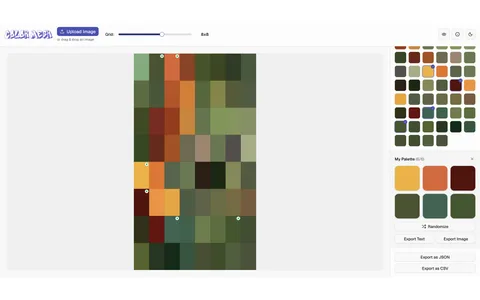
Move the slider to change the grid. Select up to three colours for your palette.
Pick a colourPick a colourPick a colourSample colour field for this demonstration
Why I added each feature
Which part of this moodboard?
Adjustable grid
Break the moodboard into selectable colours.
Can I pick just that colour?
Eyedropper
Choose a specific colour directly.
Why must I fill six slots?
Flexible palette size
Make a three-colour palette without filling six slots.
Will these colours read well?
Contrast checker
Check contrast without opening another website.
What is that website using?
Style extraction
Find the exact fonts and colours used on a website.
How I built it
Figma interface design → UX direction → AI-assisted implementation → Second version after feedback
Source & context
This started with my own client work. I designed the screens in Figma and used AI-assisted coding to build the site. Feedback later informed a second version for an academic project. The grid here demonstrates the interaction using a sample colour field.
The approach
What I did
I divided the image into a grid ranging from four to 144 cells. Users could select colours from it and build a palette. Later I added an eyedropper, flexible palette sizes, contrast checking and website style extraction. I also used ColorMesh for an academic project, collecting feedback and making a more personalised second version.
The work.
Select an image to view it full size.
Eco Contributions